

How I Use DiscoHQ to Run My Blogging Business
When AI started eating the internet around 2023 and 2024, many bloggers and online writers thought they—we—were doomed. So did many people who like reading words written by humans.
We weren’t entirely wrong. AI made it cheap to fill a website with low-quality writing. People also started accusing anything with an em dash of being AI slop. I have a few words about that.
I still wanted to write, and I still had blogs to run. So I started using AI for the parts of publishing that kept dragging me away from the writing: finding old articles, preparing drafts, uploading images and checking traffic.
I built DiscoHQ to connect that work to my actual sites. I can now ask ChatGPT or Claude to read a post, work on it with me and save the result in WordPress. Here’s how I use it, including the bits that still need my attention.
Updates
* 2 October 2026: Added a separate cover illustration and revised the explanations of my writing and publishing workflow.
* The traffic charts cover 3–30 September 2026; the Analytics screenshot shows its own rolling date range.
In this post
- I started with a web app. Obviously.
- Then I connected it to ChatGPT and Claude
- What I connect to DiscoHQ
- How I keep the writing in my voice
- How I take a post from notes to publication
- How I check traffic and revisit old posts
- Early results
- Who I’d recommend this workflow to
I started with a web app. Obviously.
The first thing I built was a web application. Of course it was. I called it HQ: a place to connect my blogs and manage them without opening a different WordPress admin for each site.
Each blog has its own articles, categories, images and writing style. A motorcycle guide needs different examples from a language article. Even when I know what I want to say, I still have to find the right links, prepare the images and put everything in the right place.
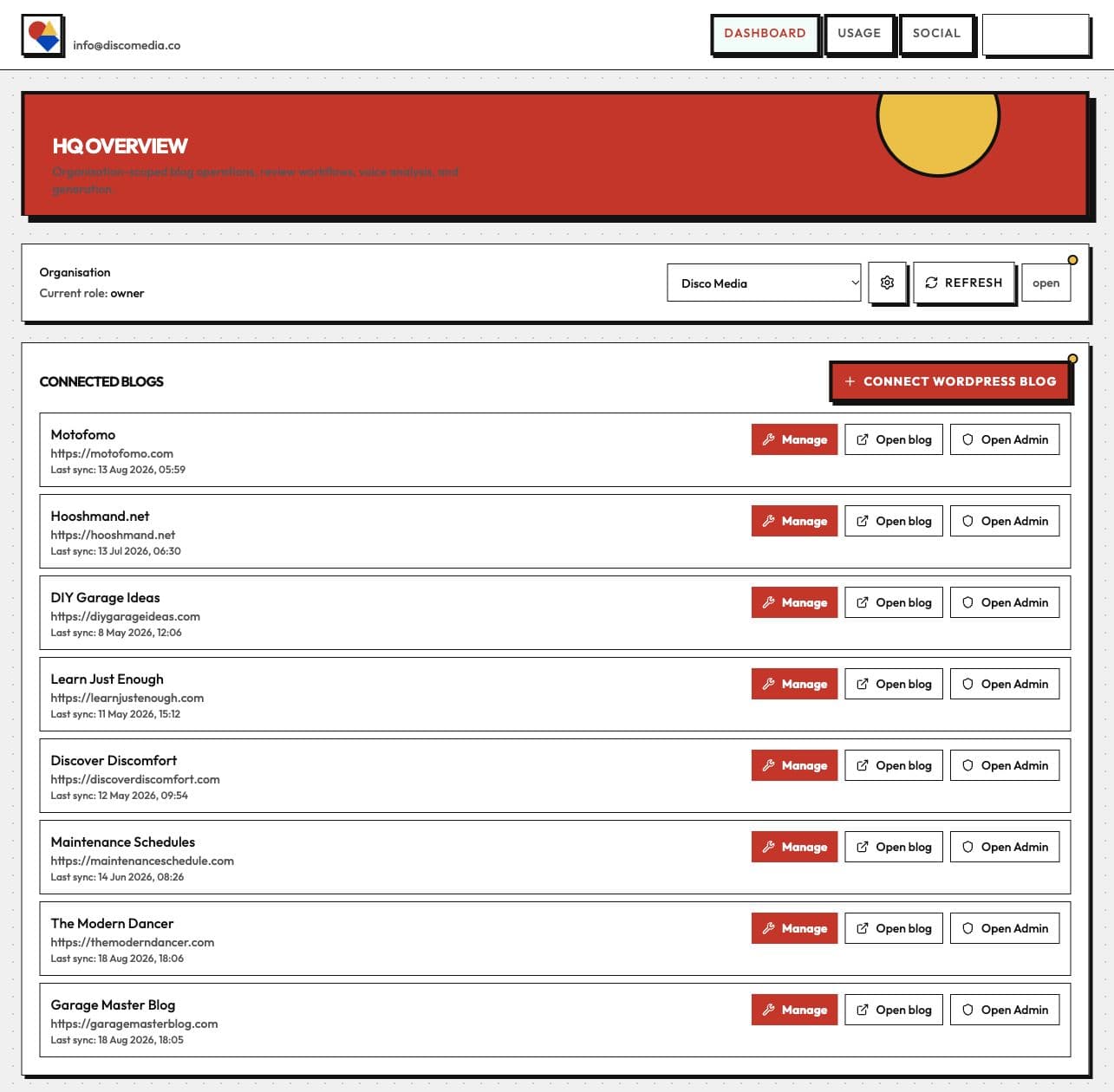
The dashboard gives me one place to see the connected sites. I still use the web app to connect services and inspect things that are easier to read on a dedicated screen.
But I’d often discuss an idea with an AI assistant, then copy the result into HQ. I’d built another place to paste things. Congratulations to me.
Then I connected it to ChatGPT and Claude
I wanted the assistant to do that carrying around for me. It could help with the writing, but it needed access to the posts and somewhere to save the result.
So I gave HQ an MCP connection. MCP stands for Model Context Protocol. It lets an assistant call specific tools: read a post, find an image, look up traffic or save a draft. Those tools became DiscoHQ.
ChatGPT or Claude does the writing and analysis. DiscoHQ reads from the connected services and carries out the actions I authorise. I can stay in the conversation while we work on the article.
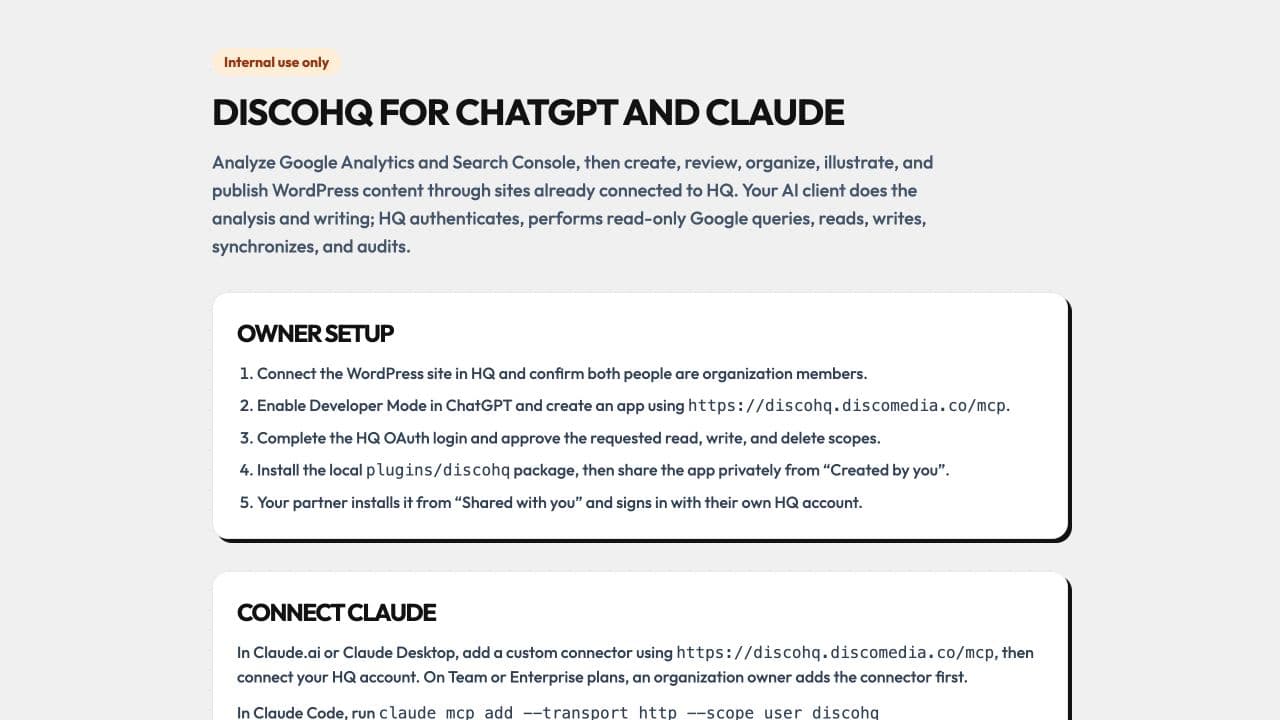
For example, I can give it this instruction:
Read three relevant posts on Hooshmand.net for voice. Turn my notes into a complete draft, with internal links, an excerpt and the existing categories. Leave it unpublished.
The assistant can read the articles from the site and save the draft there. I don’t have to collect the examples and paste them into the chat first.
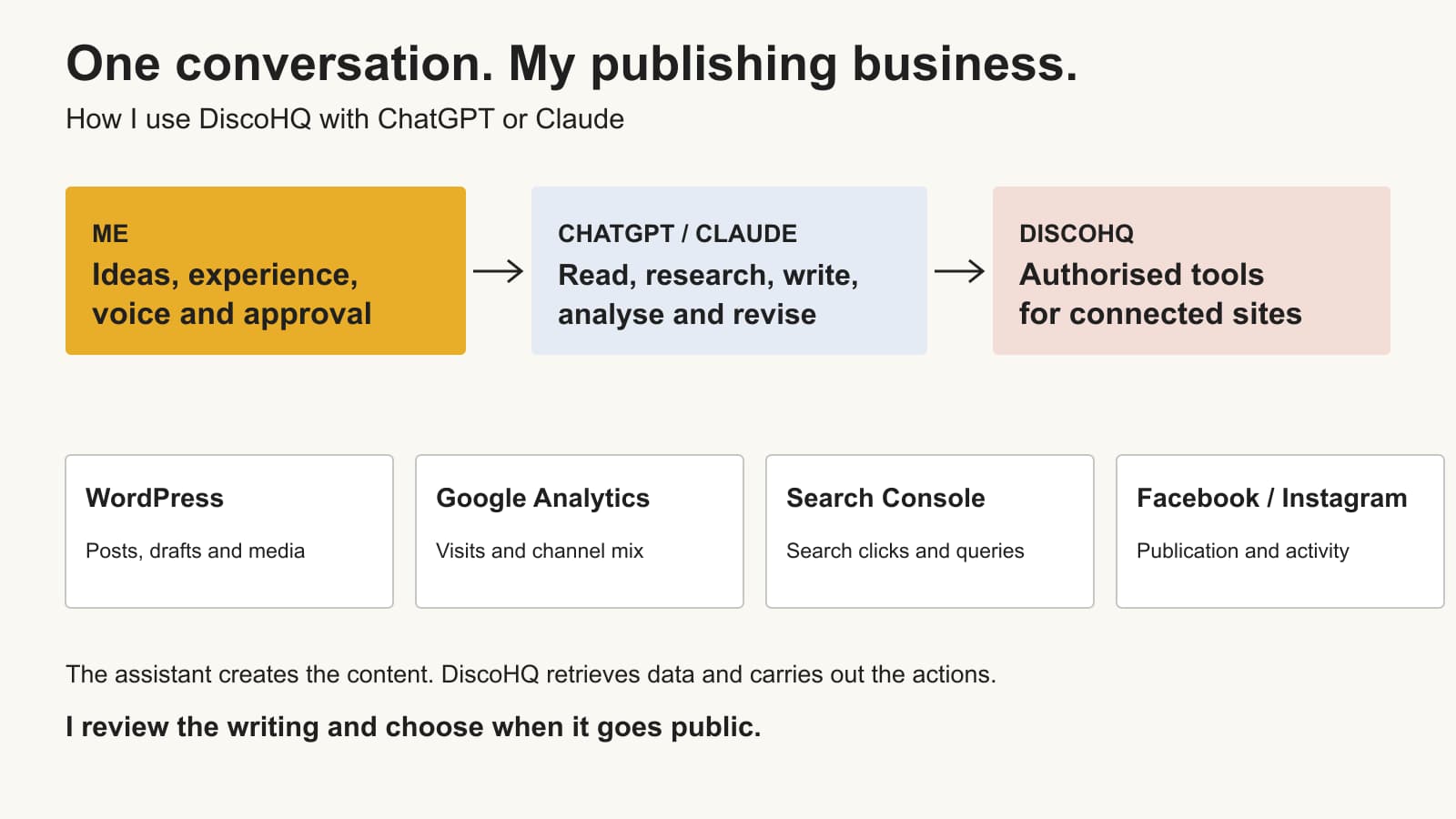
I explain the broader approach in my guide to running a business with AI. DiscoHQ is how I apply it to my blogs.
What I connect to DiscoHQ
Most of the publishing work goes through WordPress. I can find an old article, read the complete post, finish a draft or prepare an edit. DiscoHQ also handles categories and the media library.
I use Google Analytics 4 to see reported visits and traffic sources. Google Search Console shows which searches bring up my articles and how often people click them. If a post loses traffic, these give me somewhere to start investigating.
For social posts, I connect Facebook Pages and linked Instagram professional accounts. Facebook can take the published article’s link. Instagram can take its cover image and a caption. I choose the accounts and ask for each publication.
HQ also has Content Patrol, which uses the archive and Search Console data to suggest articles to investigate. I review its proposed edits before changing a published post.
When I add another WordPress blog, I connect it in HQ. I build the website separately, then use DiscoHQ for its publishing work.
How I keep the writing in my voice
“Write in my voice” can produce a page that means roughly what I meant but sounds like someone I’d avoid at a conference.
I start with examples. Before a new article, the assistant reads two to five relevant published posts. I want it to see the actual writing, including the amount of detail I give and how I explain things.
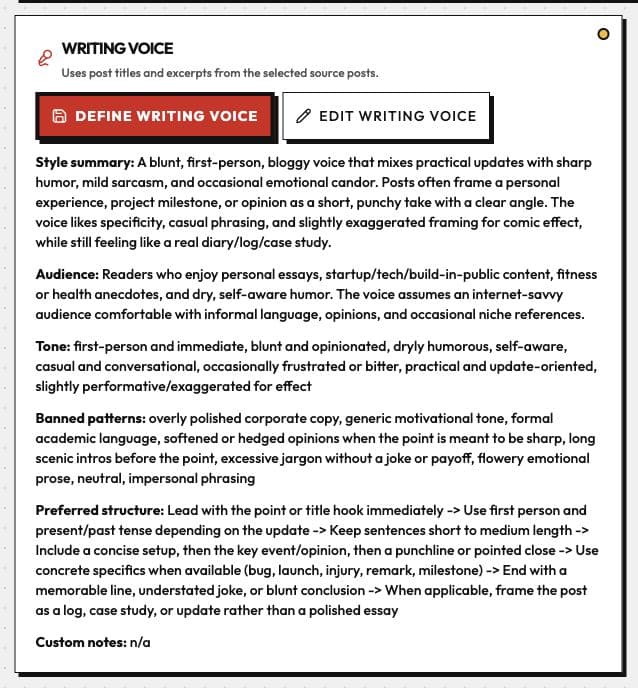
The saved voice profile gives it a reference, too. But I still ask it to read posts that fit the job. A practical guide shouldn’t sound like an angry punctuation rant, even if I thoroughly enjoyed writing the rant.
Then I give it my material. That might be an outline, an opinion or a messy account of something I built. The examples and experience need to come from me.
My style guide gives it specific rules: use short words, write in the first person where it fits, use contractions and explain what a detail means for the reader. It also bans the stock phrases that keep appearing in AI drafts.
I read the result and ask for changes. Sometimes I want to keep a sentence exactly as I wrote it. Sometimes I need to cut a sales pitch or stop the assistant turning a small technical point into a lesson about humanity.
If it invents an experience, I remove it. A sentence that sounds like me still needs to describe something I actually did.
How I take a post from notes to publication
Here’s the sequence I use:
- Give the assistant my notes. Tell it what happened, what I think and which examples belong in the article.
- Read the site before drafting. Use relevant posts for voice and find existing articles to link to.
- Prepare the complete draft. Write the body and headings, then add the slug, excerpt, categories and the site’s supported metadata.
- Add the images. Reuse something from the media library, upload a real screenshot or create a cover illustration.
- Check the result. Read the text, check the facts and links, and inspect the post’s presentation.
- Publish and distribute it. Choose when the article goes live and which social accounts get a post.
I use different images for different jobs. A cover illustration gives the reader a quick sense of the subject. A screenshot shows what the application actually does. The screenshots in this post come from HQ, and the charts use its connected Analytics reports.
DiscoHQ handles the upload work: resizing the image, setting a descriptive filename and adding alt text. It can also search the existing media library so I don’t upload the same image again.
For an edit to a published article, I review a preview of the proposed changes. That lets me check the whole post before replacing the live version.
How I check traffic and revisit old posts
Before I connected these tools, I often acted as the assistant’s courier. It needed an article, so I opened WordPress. It needed a number, so I opened Analytics. Then I copied everything back into the conversation.
Now I can ask:
Show me traffic for the five most recently published posts on Hooshmand.net. Use their exact URLs, give me the date range and separate search, direct and social traffic.
Or I can ask which pages lost the most sessions, choose an article and read it in the same conversation. That makes it easier to investigate an old post while I still have the question in mind.
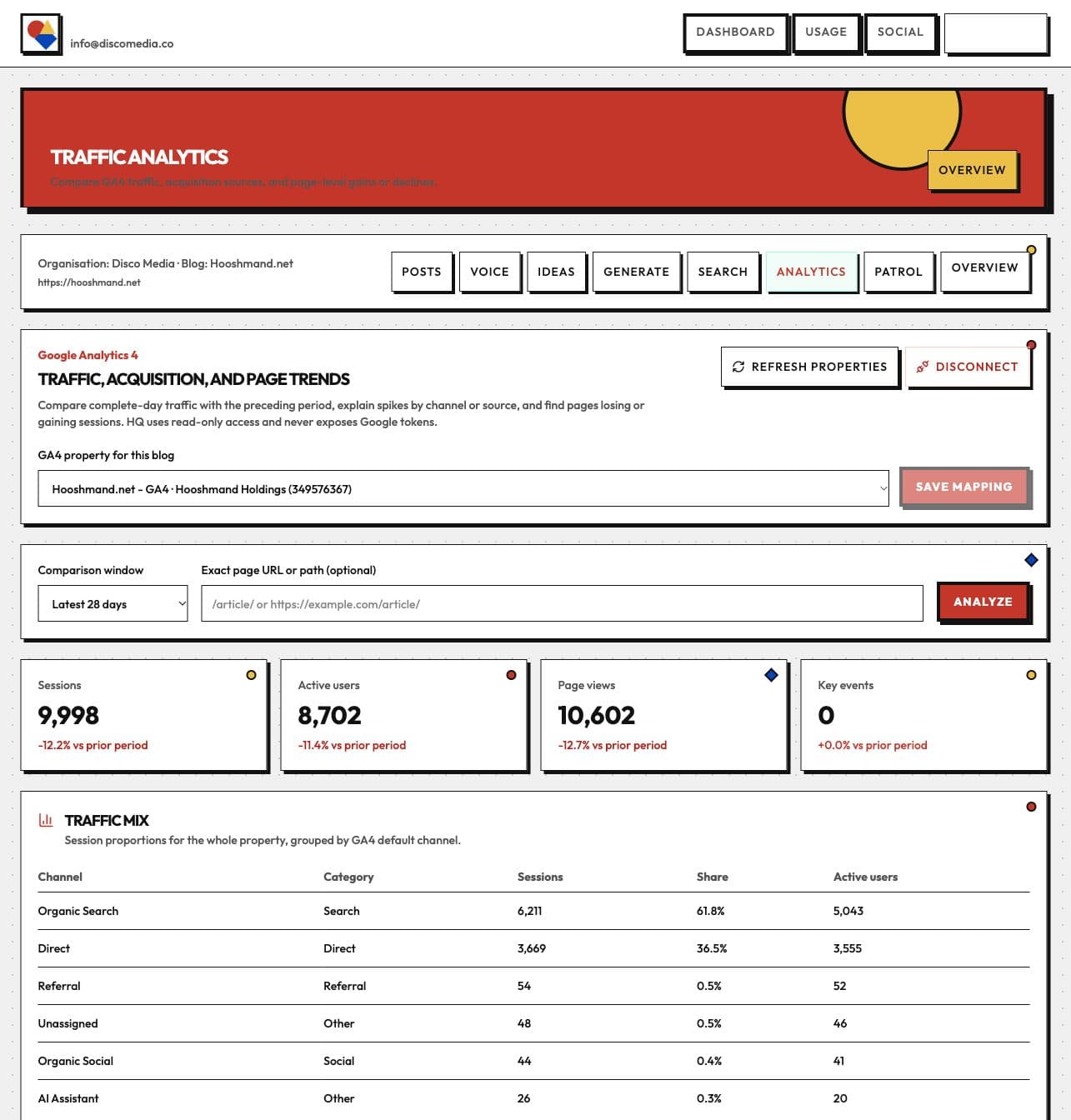
I haven’t measured how many hours this saves. I do less copying between applications, and I can finish the image and metadata work while I’m already working on the draft.
I’ve compared ChatGPT and Claude, and I have preferences. For this work, access to my sites is what lets me get the task finished with either assistant.
Early results
I wanted to include some numbers, so I checked the five posts I published before this article. The chart shows exact-page Google Analytics results for 3–30 September 2026. I haven’t established which tool created each post, so this sample can’t tell us how DiscoHQ affects traffic.
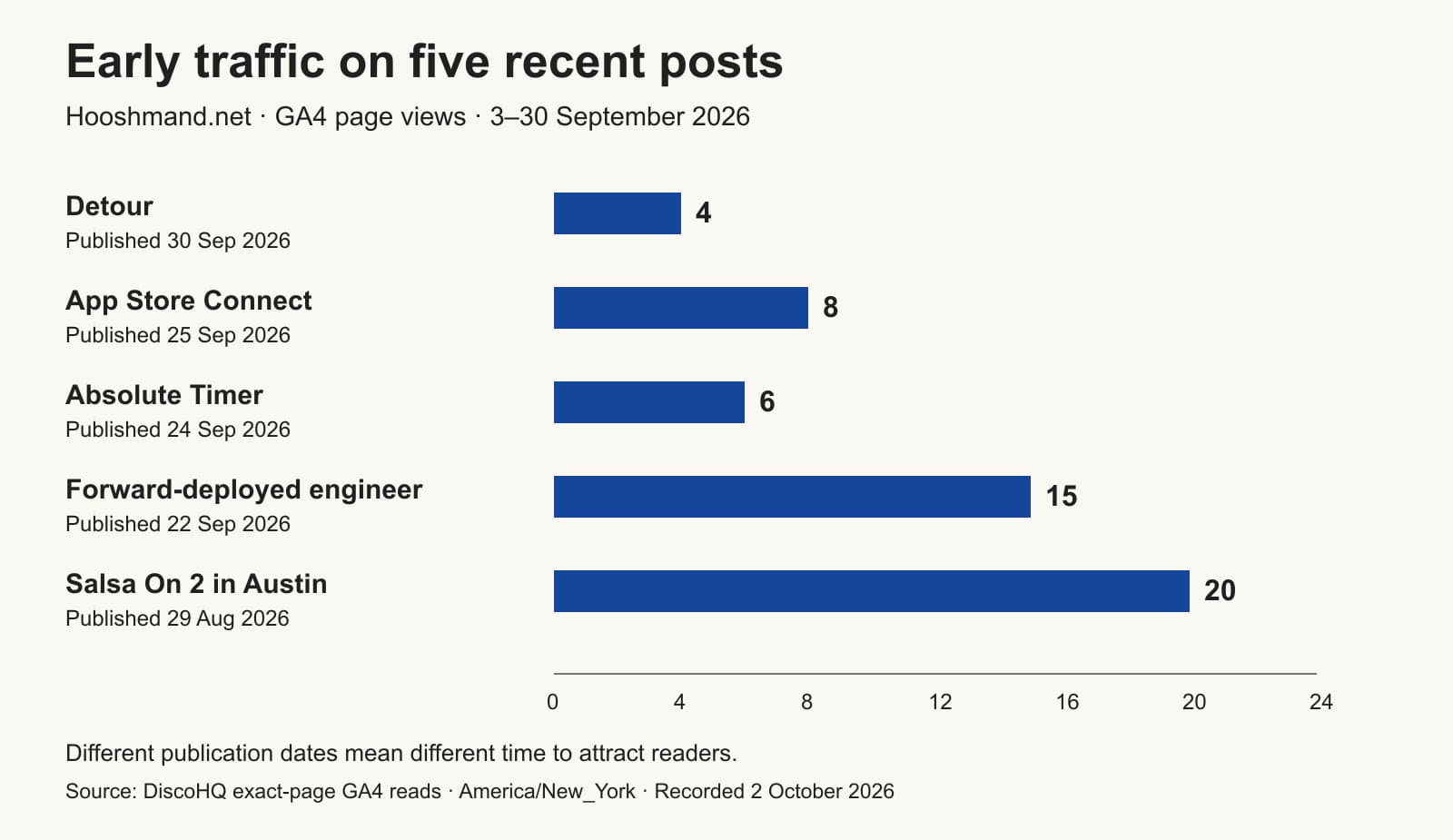
Those posts recorded between 4 and 20 page views each. They also had different amounts of time to attract readers: I published Detour on 30 September, the last day in the report, and the Austin salsa guide on 29 August.
The salsa guide recorded four organic-search sessions and three organic-social sessions in that period. Analytics classified all the Detour and Absolute Timer sessions as Direct. That label doesn’t tell me exactly who visited or why.
For context, the site’s recorded sessions fell from 11,282 in 6 August–2 September to 10,161 in 3–30 September, a decline of 9.9%.
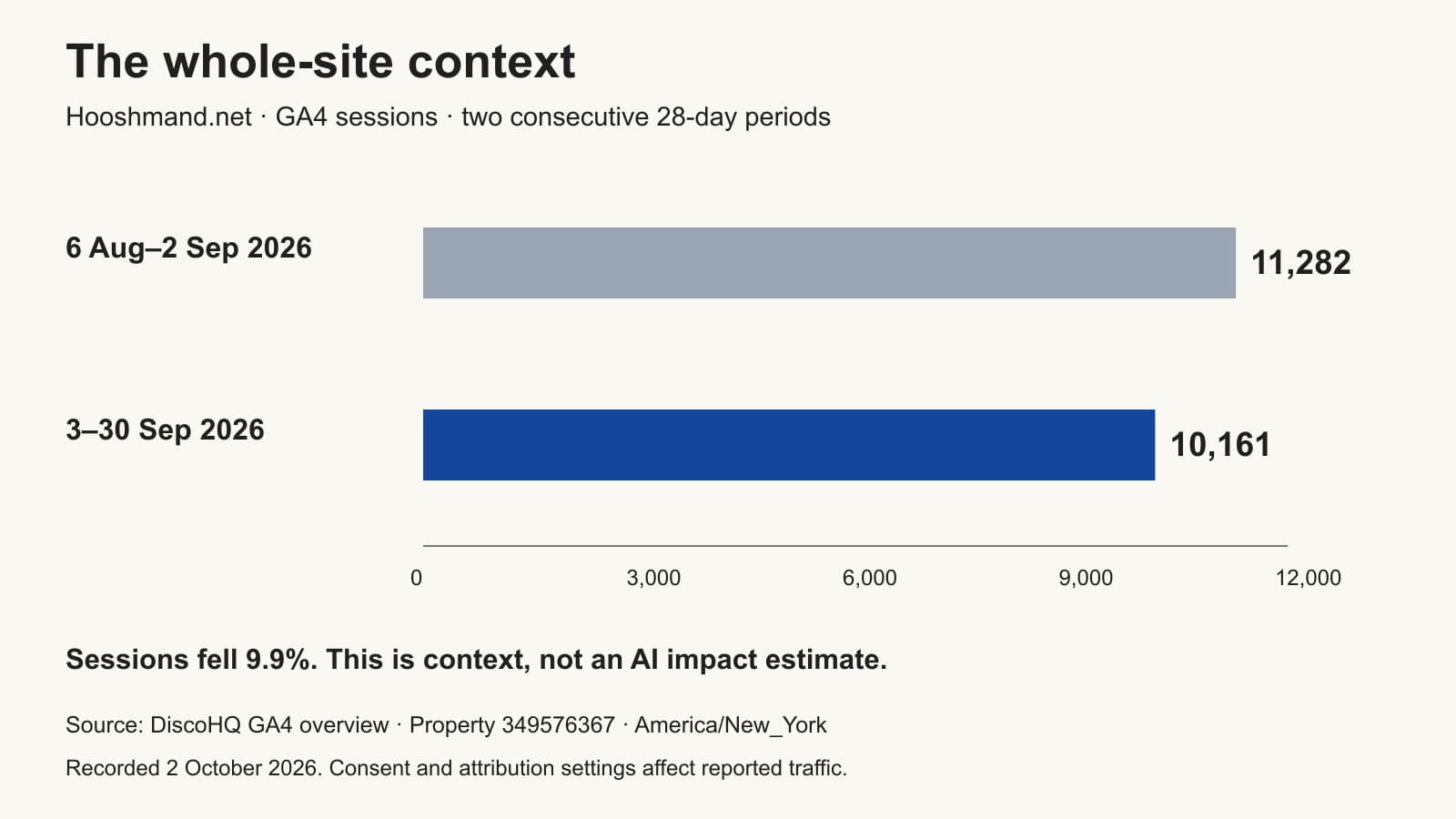
These figures don’t establish a traffic or revenue improvement from DiscoHQ. They give me a dated starting point: I can return to the articles and see whether people find them through search or social posts.
The reports use Hooshmand.net – GA4 and its America/New_York time zone. Page views count recorded views, which can include repeat visits. GA4’s consent and reporting settings affect what it records.
Who I’d recommend this workflow to
If you run several WordPress sites and already work with an AI assistant, connecting the assistant to your posts can save you a lot of carrying things between applications. You’ll still need source material, a writing guide and time to read the result.
If you publish occasionally on one site, WordPress and a separate chat may be enough. I built DiscoHQ because the repeated admin across my blogs was getting in the way of the writing.
DiscoHQ is currently my private tool for authorised sites. You can read the DiscoHQ guide for the connection and workflows.