
Ghost Review 2026: Still My Pick for Simple Blogging
A friend asked me what platform to use for a blog. They wanted to write articles, put them on their own site, and not spend the weekend fixing a server or fiddling with a theme. When that’s the brief, I still start with Ghost.
Ghost makes writing and publishing pleasant. It now handles newsletters, free members and, on the right plan, paid subscriptions in the same place. It’s a good fit if the publication is the website. If you’re building a shop, directory, tool or a site with lots of different page types, I’d start with WordPress instead.
I ran this site on Ghost for years. I moved it to WordPress in late 2023 because our other commercial sites use WordPress and I wanted one stack across them. I still miss how little Ghost asked of me when I sat down to write.
Disclosure: some Ghost links here are affiliate links. I may earn a commission if you sign up, at no extra cost to you.
Updates
- October 2026: Checked Ghost’s current editor, hosting plans, newsletters, memberships and self-hosting requirements.
- Refreshed the comparisons with Medium, WordPress and Squarespace, and replaced the old editor image.
What do people want from a simple blog?
Most people I know who want to start a blog have a fairly short list. My friend wanted:
- An editor that’s a pleasure to write in.
- No need to muck around with servers, updates or code.
- A good-looking site they could set up without becoming a designer.
- Their own domain and a way to take their writing elsewhere if they changed their mind.
- A bill that made sense for a small publication.
That’s a different brief from “build me a website that can do anything.” Ghost is very good at the first one.
Why I still like writing in Ghost
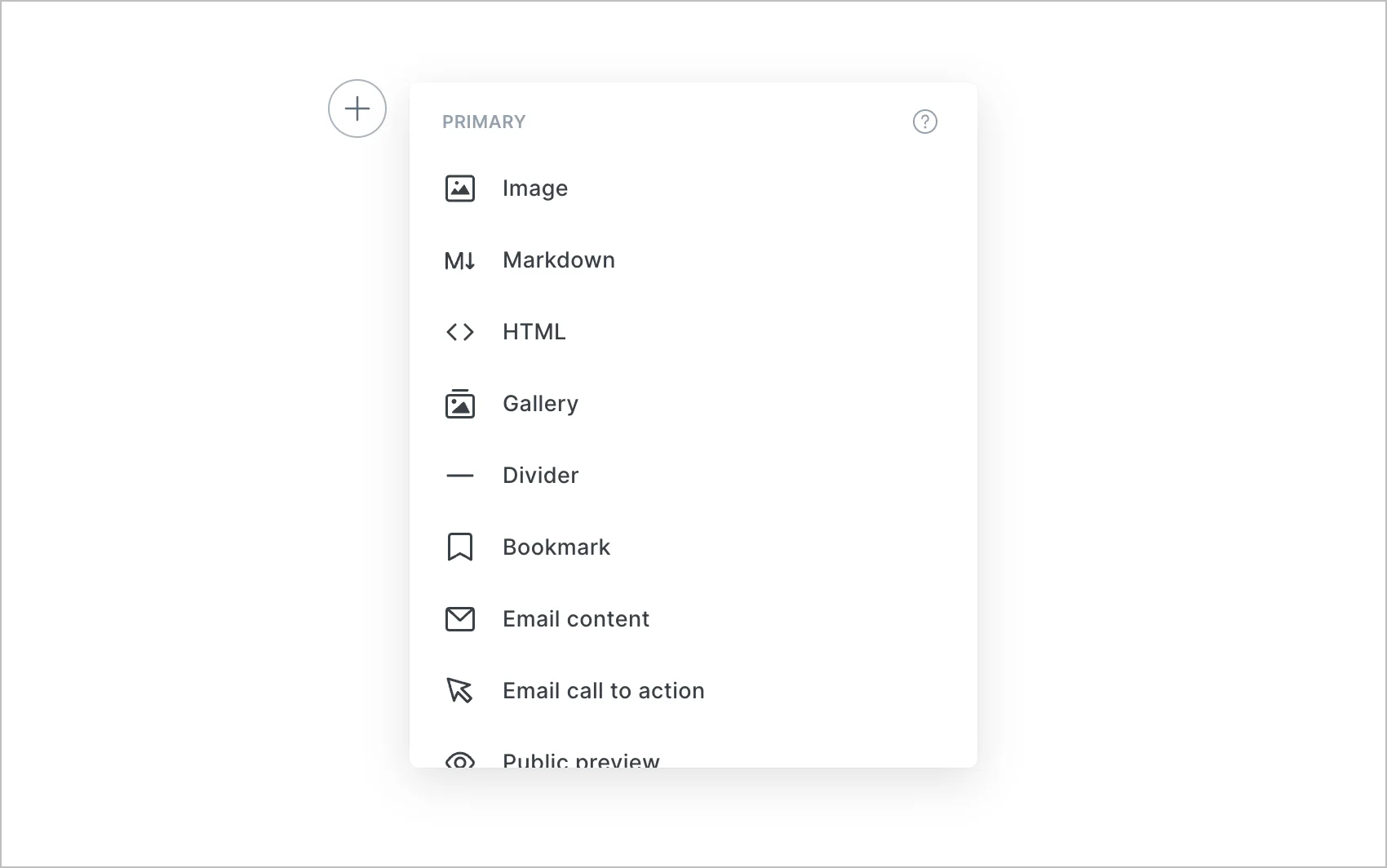
Ghost’s editor gives me a clean page and lets me start typing. When I need a photo, gallery, bookmark, signup form or email-only section, I add a card. It has an image editor, post history and internal linking too. Those tools are there when I need them, but they don’t take over the writing screen. Ghost’s editor guide shows the current setup.
The site setup is similarly restrained. Pick a theme, add your domain, set your colours and start publishing. Ghost includes sensible SEO basics such as canonical URLs, sitemaps and meta descriptions. You can export your content and member list; you aren’t stuck leaving your writing behind if the project changes.
Ghost is also more than a blog editor now. You can collect free members, send email newsletters, run member comments and publish to the social web. Ghost 6 added native traffic analytics and a way for people on other open platforms to follow and respond to posts. Ghost’s release notes explain what changed. The paid subscription and advanced analytics tools depend on your Ghost(Pro) plan, which I’ll get to below.
Ghost vs Medium
I used to really enjoy writing on Medium. Its editor is lovely, and Medium can put your work in front of readers who haven’t heard of you. If you want to write the occasional article without running a site, that’s a fair reason to use it.
Medium now lets members connect a custom domain, so that isn’t a reason to rule it out. The real question is how much control you want. A Medium publication still works inside Medium’s design and publishing system. Ghost gives you more say over the site, the reader relationship and how you earn from it.
For a handful of essays, I’d be happy on Medium. For a blog I hoped to turn into my own publication, I’d choose Ghost. I’ve gone into this in more detail in my Ghost vs Medium comparison.
Ghost vs WordPress
WordPress is amazing. I use it for this site and our commercial sites because it can grow in almost any direction. We’ve made content libraries, landing pages and more specialised tools with it. Its block editor has also improved a lot; it isn’t fair to judge WordPress by the editing experience I remember from years ago.
But that flexibility brings decisions. You choose hosting, a theme, plugins and often a separate email or membership setup. A good managed host takes a lot of server work off your hands, but somebody still needs to decide which parts belong in the stack and keep them working together.
If I were making one publication with articles and a newsletter, I’d try Ghost first. If I expected a shop, custom content types, a directory or unusual integrations, I’d choose WordPress. My Ghost vs WordPress comparison goes through that choice in detail.
Ghost vs Squarespace
Squarespace makes it easy to put together a handsome site. I’d look at it for a portfolio, service business or shop where the pages and layout matter at least as much as the articles.
For a writer who wants to open the editor and publish, Ghost feels more direct to me. Its newsletter, membership and paid publishing tools all sit alongside the posts. Squarespace gives you more of a general website builder; Ghost gives you a publication.
How much does Ghost cost?
For most people who don’t want to manage a server, I’d use Ghost(Pro). As of October 2026, Ghost’s listed annual-billing prices start at US$18 a month for Starter and US$29 a month for Publisher. Monthly billing costs more, and the plan price can rise with your member count, so check the live calculator before signing up.
Starter covers a solo blog or newsletter with one staff user and Ghost’s built-in theme settings. If you want to install a custom theme, charge for subscriptions or see Ghost’s advanced native analytics, you need Publisher or higher. Ghost doesn’t add its own transaction fee to paid subscriptions; Stripe’s processing fees still apply. All new Ghost(Pro) sites get a 14-day trial.
You can self-host the open-source software instead. That can be cheaper in cash, especially if you already run servers, but you become the person responsible for updates, backups, security, email delivery and the database. Ghost’s production hosting guide calls for Ubuntu, Node.js, MySQL and NGINX, and some newer services need extra setup. If phrases like “SSH to the server” and “restore the database backup” make you nervous, don’t choose self-hosting to save a few dollars.
What still gets in my way
Ghost is deliberately narrower than WordPress. You can change a theme and connect other services, but if the site needs a very particular layout or a custom way of organising content, you may end up editing theme code. Ghost(Pro)’s Starter plan won’t let you install a custom theme at all.
The cost also matters. US$18 a month on annual billing isn’t outrageous for managed hosting and newsletters, but it’s a lot if you publish twice a year. I wouldn’t recommend paying for a publication platform before you know you want to keep publishing.
And I wouldn’t self-host Ghost just because the software is free. I’ve done enough server work to know that a cheap virtual machine can become an expensive hobby when something breaks. Ghost(Pro) is the easy version of Ghost.
My verdict
I’d recommend Ghost(Pro) to my friend if they want a proper home for regular writing, perhaps with a newsletter or paid readers later. They can start with a theme and spend their time on the articles. Ghost’s non-profit, open-source model is another reason I’m comfortable recommending it.
If the blog is only one part of a bigger website, I’d pick WordPress. That’s the choice I made for this site. I don’t miss running two different platforms, but I do miss Ghost’s editor.
If the writing-first route sounds right, try Ghost for 14 days. You’ll find out quickly whether you like sitting down to write in it — and that’s the part I’d test before choosing any platform.