
How to Create a Custom Ringtone on an iPhone
This is an easy way to create a custom ringtone for an iPhone that actually works. Because I just did it!
This is a combination of all the various guides on how to create a custom ringtone for an iPhone. It’s something I needed to learn how to do as I recently switched back form an Android phone (I regularly switch back and forth between Google Pixel phones and Apple iPhones).
It’s easier than people say — though it’s still not as easy as it is for Android.
Here’s what I did. I wanted to use the chorus from “I’m Just Ken” from the Barbie soundtrack, because that chorus makes me happy, and thus I’m always in a good mood when the phone rings.
Total time to do this: About 15 minutes, mostly fiddling with different apps (or downloading a bit of software or two).
Steps to Create a Custom Ringtone for iPhones
First, get your sound file. It could be a WAV or MP3 or any other format of file.
I’m going to assume that you know how to record an mp3 or extract one from a video. This is your starting point!
Second, trim a copy of your sound file to less than 40 seconds. This is something I didn’t know from most guides on creating custom ringtones.
I use Audacity, and old-school (but free) audio editor. Once I trimmed the file, I exported it as WAV format (which is lossless). The file was 7.5 MB.

Third, convert your trimmed file to m4r format.
Various online guides suggest you have to use Garageband to do this. You don’t! I just used Convertio.co, an online web-app that does a bunch of conversions.
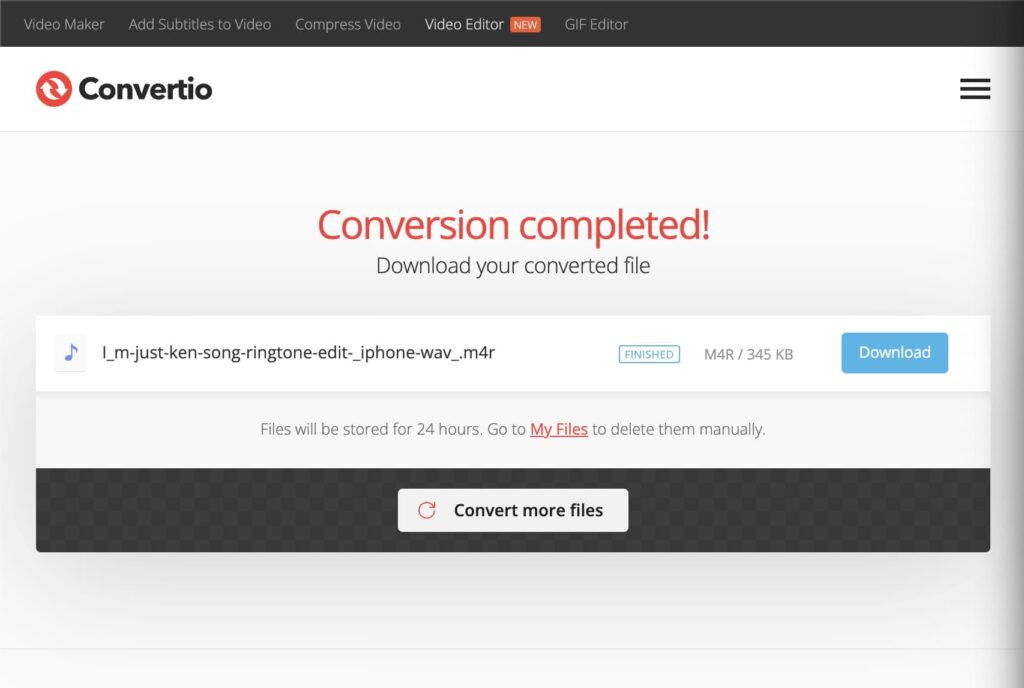
You can google “Online m4r converter” and use whatever app takes your fancy (these apps seem to come and go).
Fourth, upload the ringtone to your phone in Finder.
This is a weird step as it’s non-obvious.
Connect your iPhone to your Mac (presuming you have one) with a USB cable or USB-Lightning cable. If you need to grant permission on either side to trust the phone, do that.
Click on the phone in the finder. You should be in the “General” tab. Even though there’s no obvious place to drag a file, this is where you upload the file.

Drag it in. The bottom bar will briefly flash with file transfer activity. If that doesn’t happen, it didn’t work!
After that, it’ll be available on your phone as a ringtone.

Other stuff I tried
Other things I’ve seen recommended that didn’t work or seemed too hard were:
- Using Garageband to convert a song to ringtone format. I couldn’t be bothered and thought “there must be an easier way”. There is.
- Using the Music app on Mac OS X. Many old guides reference some tab in the app that doesn’t exist.
Like other methodologies, I presume this one will become outdated over time! But people are still commenting as of late 2024… so I’ll assume it’s still all good.






I don’t have a MacBook. What should I do?
Sorry, I don’t know! I’d be guessing or looking up other guides to tell you. But if you find out, I’d be interested to know.
If you have any Mac (it doesn’t have to be a MacBook), that will work.
If you don’t have a Mac at all, then download the linked software below, and that should work:
https://support.apple.com/en-us/118290
Perfect solution. Just what I was looking for. Thanks!
I’m glad!
Thank you , it worked i was able to use your instructions to put a ringtone on my iphone.
Glad to hear it, having it work for strangers across the world is all I was aiming for! Thanks for letting me know.
FINALLY!!!!
Thank you for this!!
I’ve tried several methods from Apple support to a bunch of so-called “Mac Experts” but this one hit a home run on the first try. I’m feeling all fuzzy inside!
I’m so glad it worked for you, too! (And I swear to take this post down when it no longer works…)
Simple and efficient! Thanks.
a very simple solution for creating ringtones from youtube/ general videos in mp4:
run this in the macs command line: ffmpeg -i “in-file.mp4” -c:a copy -vn -dn -t 29.99 “out-file.m4r”
some explanation:
from my limited understanding mp4 video uses aac audio, and audio_file.aac can be renamed to audio_file.m4r and its a functioning ringtone. so, if you got an .aac file, you don’t need a website to convert to m4r, just rename it.
(of course all this assumes that you know how to navigate the console. please don’t run this command without knowing how to navigate the console.)
(this should also work on linux.)
This is awesome. Congratulations “Theoretically Hugo”, you’ve made the single most useful comment I’ve ever received! ????